 Autofill Forms by Rule
Fill the same forms again and again. No daily limit.
Rules match each site and each field by name, ID, label or a /regex/ pattern, then fill text, drop-downs, checkboxes and radio buttons from your saved profiles. No daily limit on fills, even on the free plan. Your values stay in your browser.
Free to install. Pro is a one-time key, no subscription.
- No daily cap
- Per-site & regex rules free
- Drop-downs & checkboxes too
- No account
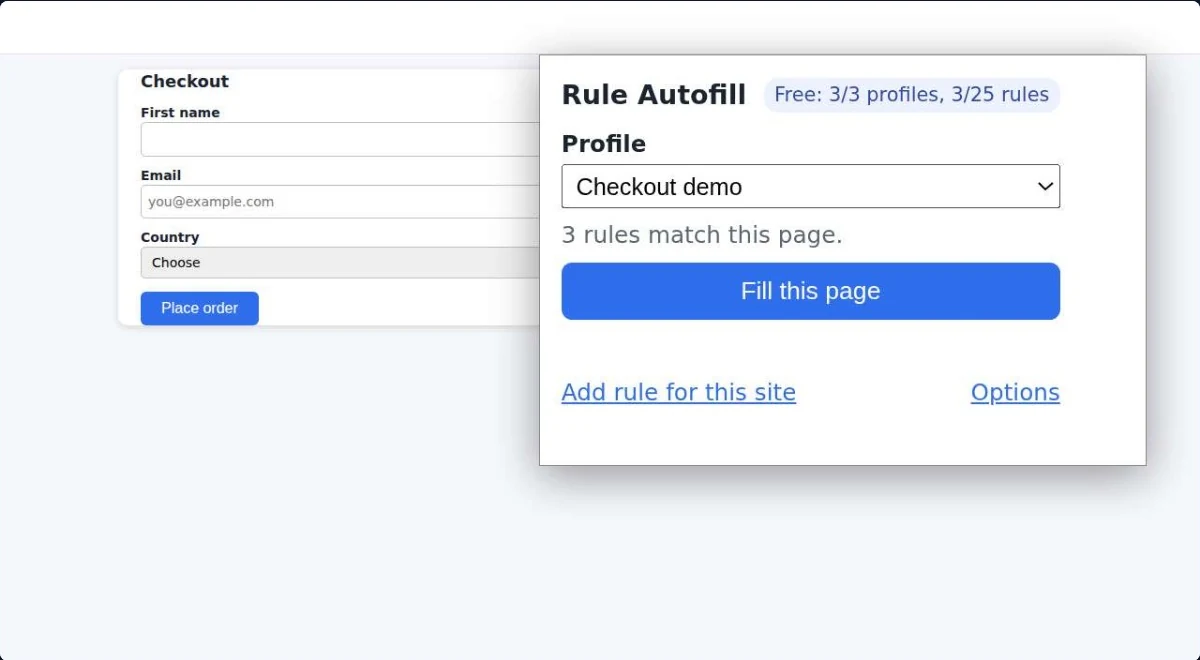
You fill the same forms every day.
Test accounts on staging, CRM records, order forms, client portals. Typing the same values by hand doesn't scale, and neither do tools that ration you.
Some autofill tools stop after a few fills a day unless you upgrade to a monthly plan.
IDs that change on every page load break simple autofill. You need patterns, not exact names.
A filler that blindly overwrites what you already typed costs more time than it saves.
Its free plan allows 10 profile executions a day and paid plans are monthly (USD 4.99 or 9.99). Here the free plan has no daily cap, Pro is a one-time key from USD 9, and Pro imports your Lightning Autofill CSV, listing anything it can't bring across.
Lightning Autofill pricing page, read 15 Oct 2026. Lightning Autofill is a trademark of its owner.Set up rule-based autofill in three steps
Group your values: Work, Home, Client A, Staging user.
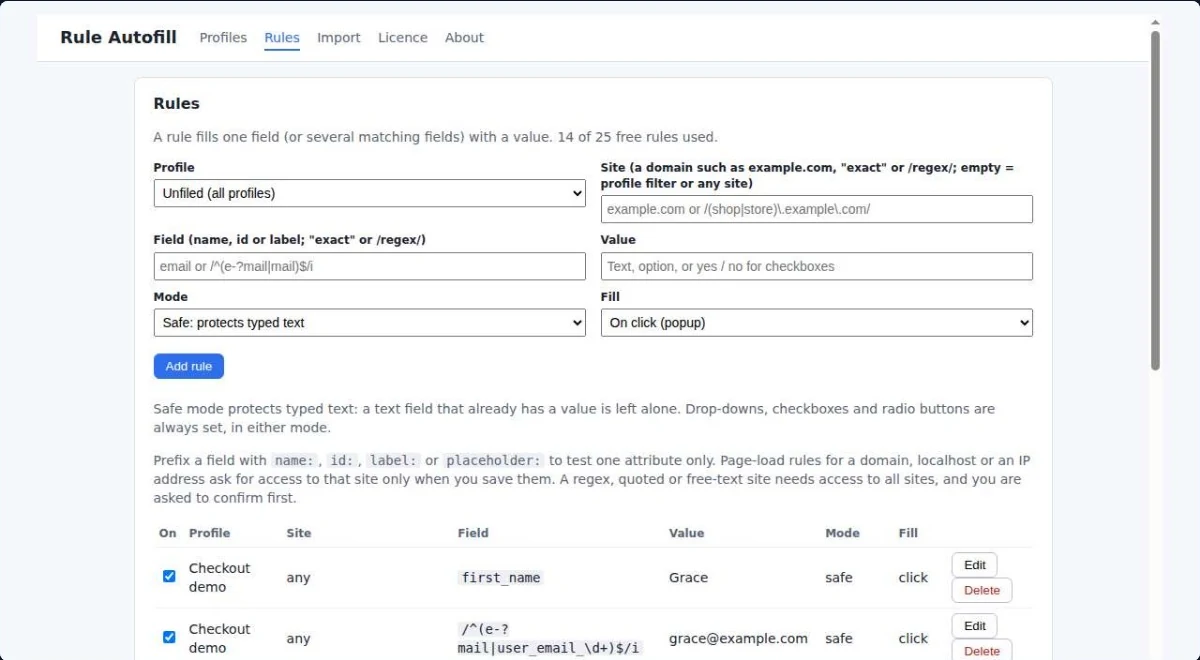
Match the site by domain or a /regex/ pattern, then match fields by name, ID, label, placeholder or CSS selector.
From the popup, with Alt+Shift+F, or automatically on sites you allow.
A form filler with per-site and regex rules
Fill as often as you like. There is no daily cap on the free or the paid plan.
Match by domain and subdomains, exact text, or a regular expression against the address or title.
Find fields by name, ID, label, placeholder or CSS selector, with a /regex/ (a text pattern) for IDs that change on every load.
Text you already typed is left alone. Overwrite mode is there when you want it.
Text fields, text areas, drop-downs, checkboxes and radio buttons, including forms built with React.
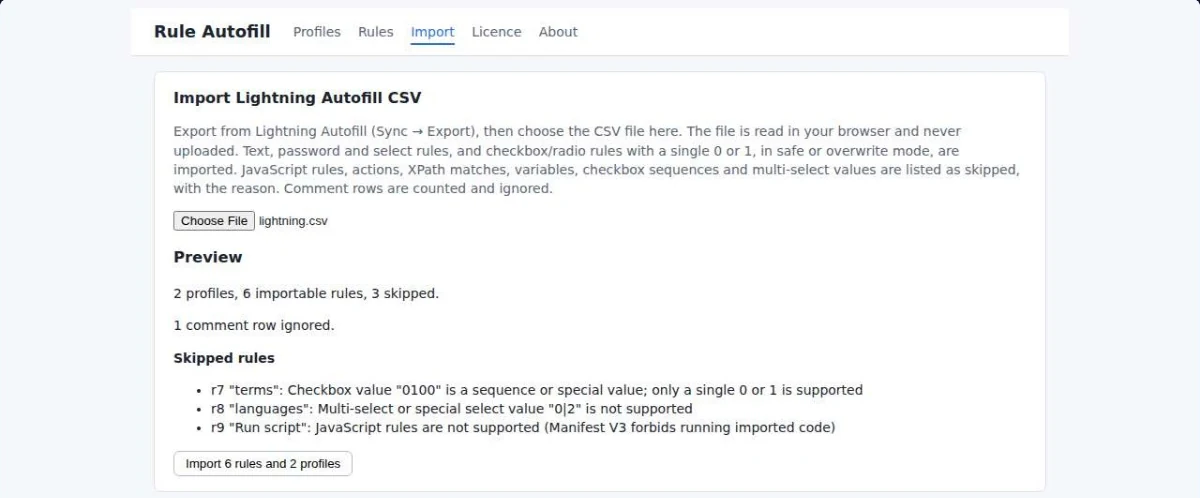
Bring your rules over from a Lightning Autofill CSV export (Pro). Anything skipped is listed with the reason.
Autofill Forms by Rule pricing: free, or one-time Pro
The free plan has no daily cap. It's limited by the number of profiles and rules only.
Free
No account. No trial clock.
- Unlimited fills, every day
- 3 profiles and 25 rules
- Per-site and regex rules
- Fill on click, shortcut or page load
- JSON export and import
Pro One-time
One-time, pay what you want from USD 9. No subscription. 30-day refund.
- Everything in Free
- Unlimited profiles
- Unlimited rules
- Lightning Autofill CSV import
Pro is a licence key sold on Gumroad by MAW2IN. You paste the key into the extension to unlock Pro.
Your form data stays in your browser.
No account and no server. Profiles and rules are stored locally, and site access is asked only when a rule needs it.
- Local onlyProfiles, rules and settings are kept in your browser's local storage.
- No site access at installA page-load rule asks for access to its site when you save it. A /regex/ or blank-site page-load rule needs all sites, and you can choose Not now.
- One-time priceA one-time key from USD 9. No subscription, no daily cap.
Exactly what happens with your data
- What is stored
- Your profiles, rules and settings, on your device only.
- Site access
- None at install. A page-load rule for a domain asks for that domain and its subdomains when you save it; a /regex/, quoted, free-text or empty site needs all sites and asks first. The Rules tab can remove all-sites access.
- The only network call
- The Pro licence check with Gumroad (
api.gumroad.com), when you activate a key: the key and product ID only.
Autofill Forms by Rule FAQ
Is there really no daily limit?
Yes. Neither the free plan nor Pro limits how many times a day you fill. Free is limited to 3 profiles and 25 rules.
Can I use regular expressions?
Yes, on the free plan too. Write a /regex/ to match the site (address or title) or the field (name, id, label, placeholder).
Will it overwrite what I've typed?
Not in Safe mode, the default: a text field that already has a value is left alone. Drop-downs, checkboxes and radio buttons are always set. Overwrite mode replaces typed text too.
Can I import my Lightning Autofill rules?
Yes, with Pro. Text, password, select and checkbox or radio rules are imported. JavaScript rules, actions and variables are listed as skipped, with the reason, and never run.
What site access does it need?
None at install. It fills the current tab after your click or shortcut. A page-load rule asks for its domain when you save it; a /regex/, quoted, free-text or empty site needs all sites, asks first, and you can choose Not now.
Does it work on Microsoft Edge?
An Edge Add-ons version is in Microsoft's review. This page will link it as soon as it's approved.
A one-person studio, MAW2IN.
Each extension does one job, keeps your data on your device and is sold for a one-time price. Every e-mail is read and answered: ceo@maw2in.com.



Stop typing the same form twice.
No daily limit, even on Free. Your data stays in your browser.